
WebM Alpha Video
Create Transparent Video for the Web
Create a WebM video with alpha transparency in minutes. Upload footage, remove the background, and export a transparent overlay for websites, product demos, and campaign creative.
Remove BG Video Instantly
Upload your video to remove background automatically
Click to upload or drag & drop
Supported formats: MP4, MOV and WEBM
Uploads containing sexual or adult content, graphic violence, politically sensitive material, or minors are prohibited. Terms
4K
Max Quality
60
Max Length
$1.50-$4
Per Min
Video Background Removal Examples
See the power of our AI video background remover. Drag the slider to compare before and after results.
Already have a green screen?
View All ExamplesSimple, Transparent Pricing
No subscriptions. Pay only to process your videos.
BASIC
Perfect to test video with webm alpha output
(180 credits) • 3 minutes of processing
What's included:
- Up to 4K video processing
- Transparent backgrounds (webm, mov, pngs, gif, webp)
- Preview for all videos
- Batch processing
- API access
STANDARD
Ideal for longer videos or multiple short videos
(600 credits) • 10 minutes of processing
What's included:
- Up to 4K video processing
- Transparent backgrounds (webm, mov, pngs, gif, webp)
- Batch processing (up to 2 videos)
- Preview for all videos
- API access
PRO
Made for long videos or 100+ shorter videos
(1800 credits) • 30 minutes of processing
What's included:
- Up to 4K video processing
- Transparent backgrounds (webm, mov, pngs, gif, webp)
- Batch processing (up to 3 videos)
- Preview for all videos
- API access
Need custom pricing or higher volumes? Contact support@removebgvideo.com
Why Teams Choose transparent WebM workflow
A WebM alpha video workflow gives you reusable transparent motion assets. Instead of rebuilding every scene, you can place one transparent alpha video workflow output over multiple layouts, themes, and campaign concepts while keeping visual consistency.
AI Subject Isolation
Generate a clean WebM transparent video workflow result without green screen setup. Preserve motion detail around hair, hands, and clothing.
Reusable Motion Assets
One transparent WebM workflow export can power hero sections, feature blocks, ads, and onboarding modules from a single source clip.
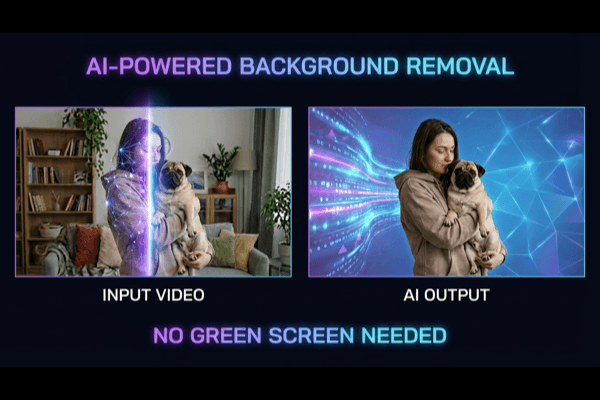
Ship transparent alpha video workflow Faster
A production-ready WebM transparent video workflow workflow reduces manual masking, shortens revisions, and helps teams publish more variants in less time.

Choose the Right Output for Each Use Case
Export your WebM alpha video workflow for websites, product demos, or post-production timelines. Pick settings by destination and keep quality stable.
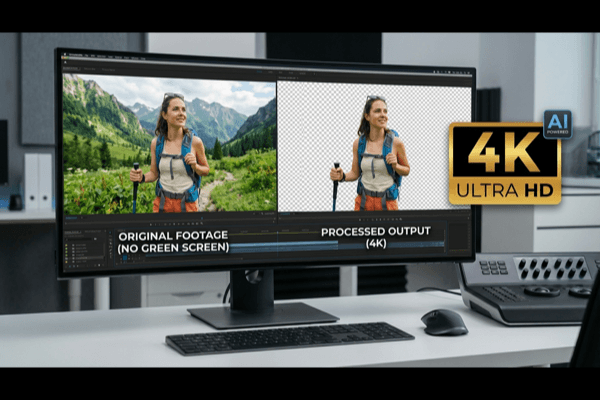
Export and test a WebM alpha overlay
1. Keep transparency in the export
Remove the source background, leave the output background transparent and choose WebM. Selecting a solid replacement scene produces a flattened result even when the file extension is .webm.
2. Test the file over two colors
Place the downloaded video over both a light and dark page background. The page should remain visible around the subject. Check moving hair and clothing as well as the first frame.
3. Embed it as a video
Use an HTML video element with a WebM source and the video/webm MIME type. Add controls while testing. For a decorative loop, consider muted, loop and playsInline, and provide a still-image fallback for users who prefer reduced motion.
4. Verify your actual playback environment
WebM file support and alpha playback are separate capabilities. Test the browsers and devices your audience uses. If transparency is lost, provide a version with a deliberate solid background rather than assuming every player handles alpha.
Format reference: MDN media format documentation.
transparent alpha video workflow FAQ
Clear answers for teams building a repeatable WebM transparent video workflow process.
Does every WebM file have transparency?
No. WebM is a container; transparency must be present in the encoded video and supported by the player. Renaming an MP4 file to .webm does not add an alpha channel.
Why does my transparent video look black?
A player may show transparency against a black surface, or it may not decode the alpha channel. Test the same file over a colored background in the destination browser before deciding that the export is opaque.
Can I use MP4 as a transparent fallback?
A standard H.264 MP4 export does not preserve an alpha channel. Use it as a flattened fallback with a chosen background, not as a transparent replacement.
Can I upload this WebM to any social platform?
Do not assume the platform preserves transparency. Upload services can transcode video into an opaque format. For a finished social post, composite the subject over the intended scene before uploading.
How do I check the export before publishing?
Play the entire downloaded file over light and dark backgrounds in the target browser. Check edges during movement, then confirm the same result on a second device and after your normal hosting or upload pipeline.

Ready to Create transparent WebM workflow?
Launch your next WebM alpha video workflow workflow with preview, cleaner edges, and export settings that work for product, marketing, and creative teams.