The Ultimate Guide: How to Remove BG from Video Like a Pro in 2025
Have you ever watched a professional video and wondered how they achieved that perfectly clean background? Whether you're a content creator, marketer, or just someone who wants to remove bg from video for personal projects, you've come to the right place. In this comprehensive guide, we'll explore every method available to help you remove bg on video files effectively.
Why Remove Background from Video?
Before diving into the how-to, let's understand why you might want to remove bg from video content. Video background removal opens up a world of creative possibilities:
- Professional presentations that focus on the speaker
- Product demonstrations with clean, distraction-free backgrounds
- Creative content where you can place yourself anywhere
- Green screen effects without actually having a green screen
- Privacy protection when recording from home
The ability to remove bg on video has become essential for modern content creators. With remote work and online content booming, knowing how to effectively remove bg from video files is a valuable skill that can transform your content from amateur to professional.
Method 1: Using AI-Powered Tools to Remove BG from Video

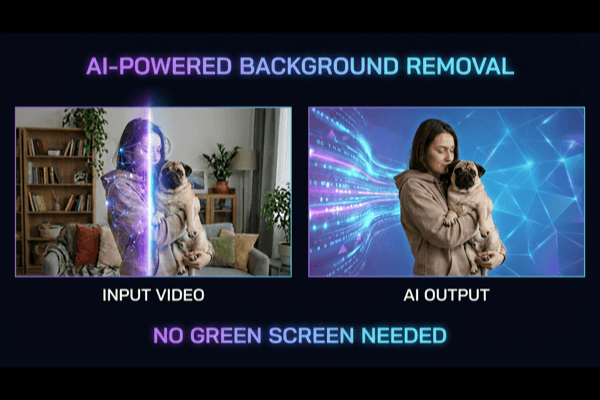
The easiest and most effective way to remove bg from video is using AI-powered tools like RemoveBGVideo. These tools analyze each frame of your video and automatically separate the subject from the background with remarkable precision.
How AI Video Background Removal Works
When you remove bg on video using AI, the technology performs several sophisticated operations:
- Analyzes each frame individually using neural networks
- Identifies the main subject using advanced machine learning algorithms
- Creates a precise mask around the subject with pixel-level accuracy
- Removes everything outside the mask seamlessly
- Outputs a clean video with transparent or custom background
The beauty of AI tools is that they can remove bg from video without requiring any special setup. You don't need a green screen, professional lighting, or technical expertise to achieve stunning results.
Best Practices for AI Background Removal
To get the best results when you remove bg on video, follow these proven tips:
- Use good lighting - Even illumination helps the AI distinguish the subject from the background more accurately
- Wear contrasting colors - Avoid wearing colors that are similar to your background to prevent confusion
- Minimize fast movements - While AI handles motion well, extremely rapid movements can cause temporary artifacts
- Use high-resolution footage - Better quality input always translates to better output when you remove bg on video
Method 2: Manual Background Removal Techniques
For those who prefer more control over the process to remove bg from video, manual techniques using professional software like Adobe After Effects or DaVinci Resolve offer precise results.
Rotoscoping Explained
Rotoscoping is the traditional method to remove bg from video frame by frame. While time-consuming, it provides unmatched precision:
- Import your video into your editing software
- Create a mask around your subject
- Keyframe the mask to follow movement
- Refine edges for each frame
- Export with alpha channel
This method to remove bg on video is best suited for short clips where absolute precision is required.
Method 3: Chroma Key (Green Screen) Removal

The classic approach to remove bg from video involves filming against a green or blue screen. This method remains popular because:
- It's predictable and reliable
- Most editing software supports it natively
- Results are consistent across frames
- It works well with complex movements
To remove bg on video using chroma key, you'll need proper lighting to eliminate shadows and ensure even color across the backdrop.
Common Mistakes When You Remove BG from Video
Even with great tools, mistakes happen. Here's what to avoid when you remove bg on video:
1. Poor Lighting
Dark or uneven lighting makes it significantly harder to remove bg from video accurately. The AI or software struggles to distinguish edges when lighting is poor, resulting in rough or inaccurate masks.
2. Similar Colors
Wearing colors similar to your background when you remove bg on video leads to parts of your subject being accidentally removed. Always check for color conflicts before recording.
3. Excessive Movement
While AI can handle movement, rapid or erratic motion when you remove bg from video may cause flickering edges or temporary artifacts that require manual correction.
4. Low Resolution
Trying to remove bg on video from low-resolution footage results in jagged, unprofessional-looking edges. Always work with the highest quality source available.
5. Ignoring Audio
When you remove bg from video, don't forget that background audio might still reference the original location. Consider your audio track separately for a polished final product.
Advanced Tips for Professional Results
Want to remove bg from video like a seasoned professional? Here are advanced techniques:
Layer Multiple Effects
After you remove bg on video, add subtle shadows or edge blur to make the subject look naturally placed in the new environment. This attention to detail separates amateur work from professional productions.
Match Lighting Direction
When adding a new background after you remove bg from video, ensure the lighting direction matches your subject for realistic integration. Mismatched lighting immediately looks artificial.
Color Grade Consistently
Your subject and new background should share similar color temperatures. After you remove bg on video, adjust color grading for visual cohesion across all elements.
Use Depth of Field
Adding slight blur to distant elements of your new background creates depth and makes the composition more natural after you remove bg from video.
The Future of Video Background Removal

The ability to remove bg from video continues improving at a rapid pace. AI advances mean:
- Real-time processing is becoming increasingly accessible
- Edge detection is achieving incredible precision
- Processing speed is dramatically increasing
- Quality preservation is improving with each generation
Whether you need to remove bg on video for professional or personal use, the tools available today make it easier than ever to achieve stunning results.
Conclusion
We've covered comprehensive methods to remove bg from video, from AI-powered tools to manual techniques. Each approach to remove bg on video has its unique strengths, and the best choice depends on your specific requirements and expertise level.
For most users, AI-powered solutions offer the easiest path to remove bg from video with professional results. Tools like RemoveBGVideo analyze each frame automatically, preserving quality while creating clean, usable output that rivals expensive professional services.
Ready to remove bg from video yourself? Try our free preview at RemoveBGVideo.com and experience professional-quality background removal in action!