
Remove BG Video to GIF
Create Share-Ready Transparent GIF Loops
Need to remove bg video to gif for social, stickers, or embedded loops? Upload your clip, isolate the subject with AI, and export a clean animated result in minutes.
Remove BG Video Instantly
Upload your video to remove background automatically
Click to upload or drag & drop
Supported formats: MP4, MOV and WEBM
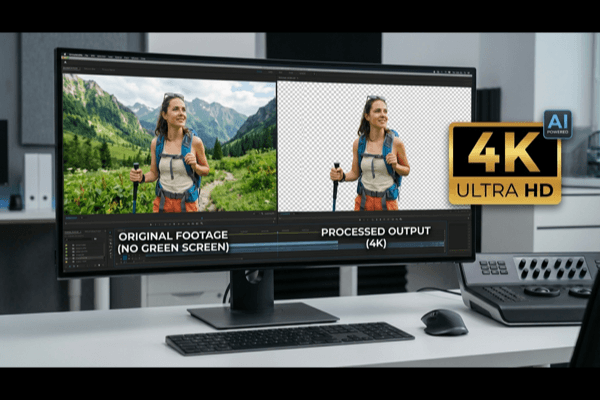
4K
Max Quality
60
Min Length
$0.50
Per Min
Why Teams Use Remove BG Video to GIF Workflows
The reason teams choose to remove bg video to gif is simple: GIF loops are still one of the most compatible animated formats across websites, chat apps, and social platforms.
AI Subject Isolation
You can remove bg video to gif without manual masking. AI handles subject extraction across frames and reduces repetitive editing.
Universal Sharing
Once you remove bg video to gif, the output can be used in social comments, community posts, presentations, and lightweight web sections.
Reusable Assets
One source clip can produce many loops. A remove bg video to gif pipeline helps teams scale content without repeated shooting.
Fast Turnaround
For campaigns and product launches, fast iteration matters. Preview and export loops in a workflow designed for quick publishing.
Multi-Format Flexibility
Even if your final target is GIF, you can maintain optional exports for web and editor workflows from the same processing session.
Team-Friendly Process
Documented presets and quality checks make remove bg video to gif predictable across creators, marketers, and designers.
Video Background Removal Examples
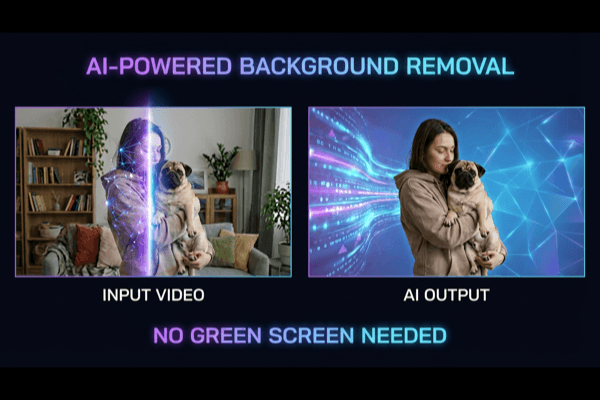
See the power of our AI video background remover. Drag the slider to compare before and after results.
Already have a green screen?
View All ExamplesSimple, Transparent Pricing
No subscription lock-in. Pay only when you export final output.
BASIC
Perfect to test remove bg video to gif workflows
(180 credits) • 3 minutes of processing
What's included:
- Up to 4K video processing
- GIF and transparent export options
- Preview before export
STANDARD
Ideal for weekly remove bg video to gif production
(900 credits) • 15 minutes of processing
What's included:
- Up to 4K video processing
- GIF and transparent export options
- Batch processing
- Preview before export
- API access (coming soon)
PRO
Made for long videos or 100+ shorter videos
(3600 credits) • 60 minutes of processing
What's included:
- Up to 4K video processing
- GIF and transparent export options
- Batch processing
- Preview before export
- API access (coming soon)
How to Remove BG Video to GIF with Better Quality
A practical remove bg video to gif workflow is not just about cutting out the background. It is about balancing edge quality, color limitations, loop length, and file weight so the final asset performs well where it is published.
Subject-First Editing
When you remove bg video to gif, edge stability drives quality. Focus on subject clarity first, then choose loop framing and timing.
Keep Loops Short and Intentional
A short clip usually produces cleaner output. Teams that remove bg video to gif for sharing often use concise loops for better readability and smaller size.
Publish Across Platforms with Less Friction
Once you remove bg video to gif, distribution is easier because GIF is broadly compatible. Use it in community content, support responses, product announcements, and embedded web storytelling.
Complete Guide: Remove BG Video to GIF
This guide covers production decisions that improve every remove bg video to gif output.
1) Start with clean footage
Stable light and clear contrast produce better edges.
2) Keep loops short
Use 2-6 second clips for smaller size and better replay.
3) Review motion frames
Check hair, hands, and turns before final export.
4) Pick channel-first output
Optimize for either compatibility or best visual quality.
5) Test before full run
Export a short sample to validate quality fast.
6) Keep naming consistent
Use clear preset names for teams and repeat workflows.
Quick Checklist
- • Preview key motion moments.
- • Confirm loop start and end are smooth.
- • Export the right size for each channel.
- • Keep one approved final version per use case.
Remove BG Video to GIF FAQ
Practical answers for creators and teams running a remove bg video to gif workflow.
What does remove bg video to gif mean in practice?
A remove bg video to gif workflow means taking source footage, isolating the subject from the scene, and exporting an animated GIF output for universal sharing. It is commonly used for social snippets, chat stickers, reactions, and lightweight web loops.
When should I choose remove bg video to gif instead of MP4?
Choose remove bg video to gif when compatibility is the top priority and you need a loop that behaves like an image asset. If you need higher color fidelity or longer playback, MP4 or WebM can be better choices.
Can I remove bg video to gif without a green screen?
Yes. You can remove bg video to gif from standard recordings using AI subject detection. Better lighting and clear separation still improve edge quality.
Is remove bg video to gif suitable for teams?
Yes. Marketing teams, support teams, and product teams use remove bg video to gif outputs for announcements, onboarding UI snippets, and branded social responses.
How do I improve quality when I remove bg video to gif?
Keep clips short, avoid heavy motion blur, and preview difficult frames before final export. This makes remove bg video to gif results cleaner and more stable.
What is the most reliable workflow for remove bg video to gif at scale?
Define source quality rules, use reusable export presets, and validate edge quality checkpoints. That turns remove bg video to gif from a one-off edit into a reliable production process.

Ready to Remove BG Video to GIF?
Start your next remove bg video to gif project with AI precision, fast preview, and export options built for modern publishing teams.